
Workforce management for contact centers & BPOs
Every agent, every minute — live against the plan.
TINIUN connects schedules, agent status, adherence and exceptions in one real-time floor. Your leads see deviations the moment they happen — and fix them before they cost the shift.
Already using TINIUN? Sign in
SAML & OIDC single sign-on · Role-based access · Full audit trail
Live in about a second
Agent status changes reach the team lead's floor almost instantly — no refresh, no interval report.
Isolated by design
Each organization's data is separated inside the database itself, not just in the app.
Audited end to end
Status changes, corrections and admin actions are recorded in an append-only history.
Enterprise sign-in
Single sign-on with SAML 2.0 and OpenID Connect, plus role- and team-scoped access.
Why teams switch
The plan says one thing. The floor does another.
Most workforce tools tell you what went wrong after the shift. TINIUN closes the gap while there's still time to act.
Adherence shows up tomorrow
Live adherence against every scheduled segment
Breaks that run long, late logins and unplanned AUX are caught while the shift is still running — not in yesterday's report.
Alerts nobody owns
Exceptions with a clear owner and outcome
Deviations are detected once, ranked by severity, routed to the right lead, and closed with notes — every step audited.
Schedules scattered across spreadsheets and chat
One published plan everyone works from
Versioned schedules, time-off and shift-swap requests, and approvals live in the same place as the live floor.
The product
One live view of the plan, the floor and what to do next.
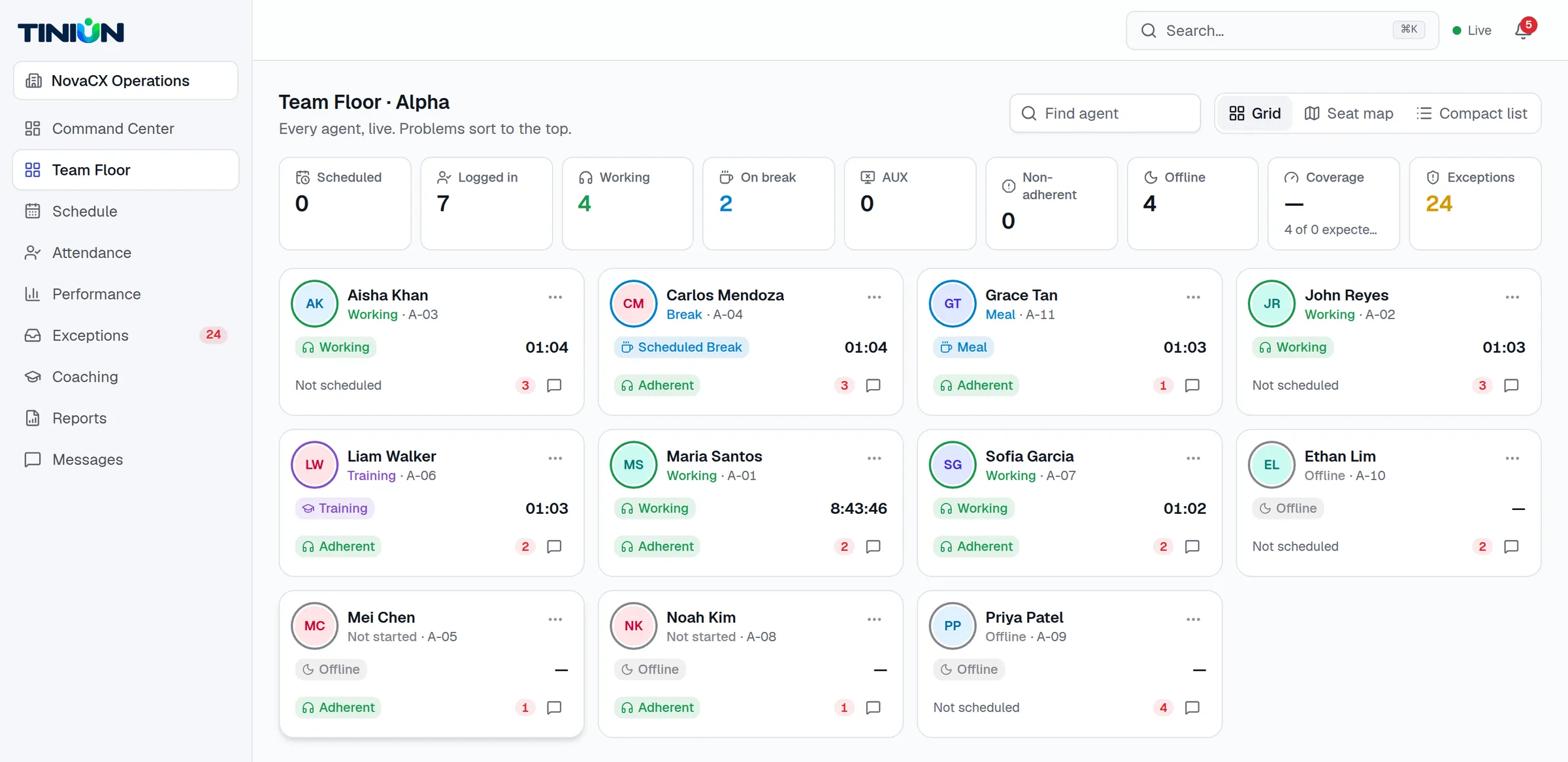
Team Floor
The live floor, sorted by what needs you
- Every agent's status, time in state and adherence — in a grid, seat map or compact list
- Problems rise to the top automatically, so nothing waits to be noticed
- Open any agent for schedule-versus-actual, history and exceptions in one drawer
- Message or coach an agent without leaving the floor
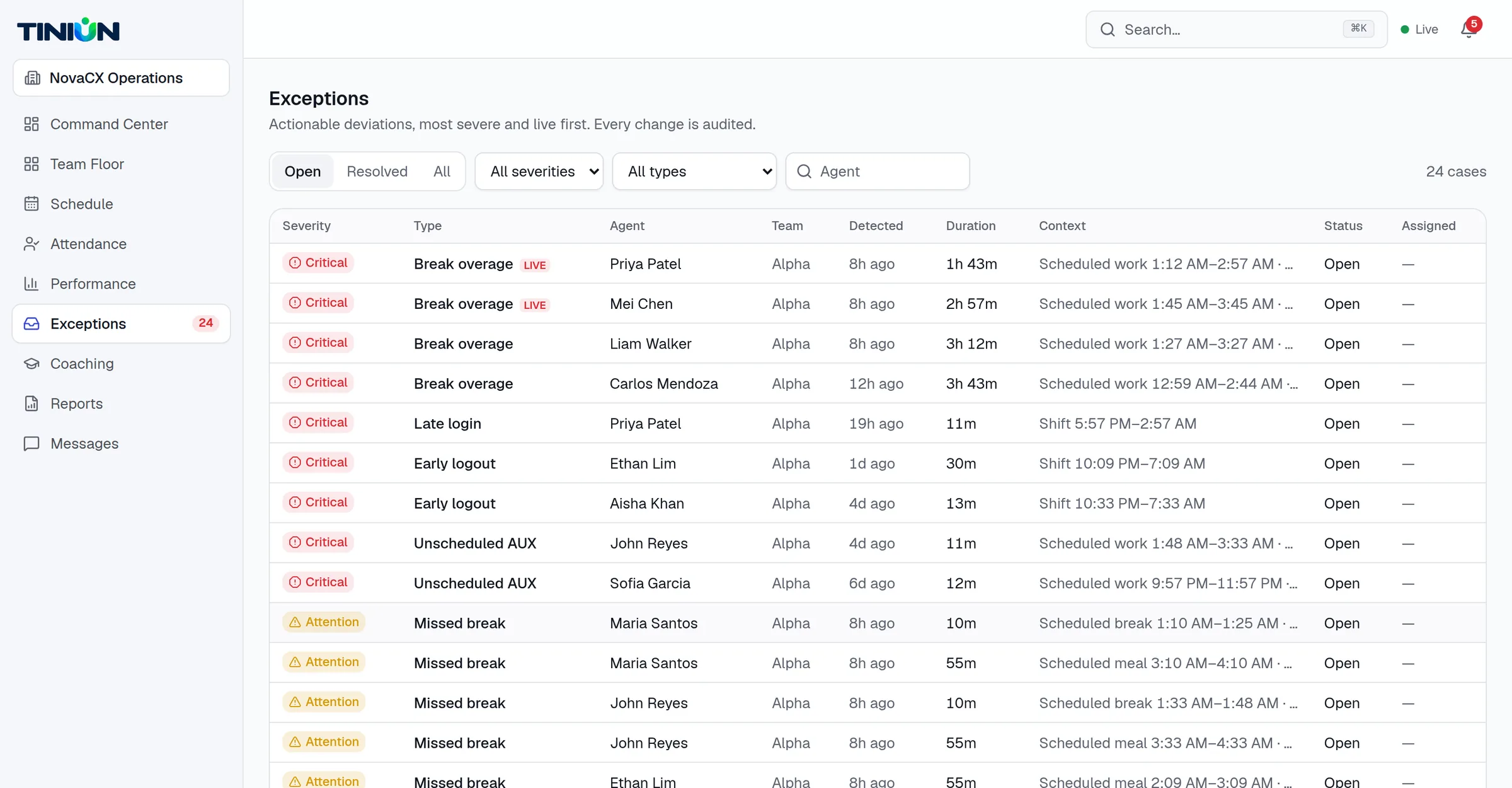
Exceptions
Deviations caught, owned and closed out
- Break and meal overages, late logins, early logouts, unscheduled AUX and missed breaks — detected automatically
- Ranked by severity, with live cases flagged while they're still happening
- Acknowledge, assign, resolve or excuse, with notes on every case
- Every change is recorded in the audit history
Agent command center
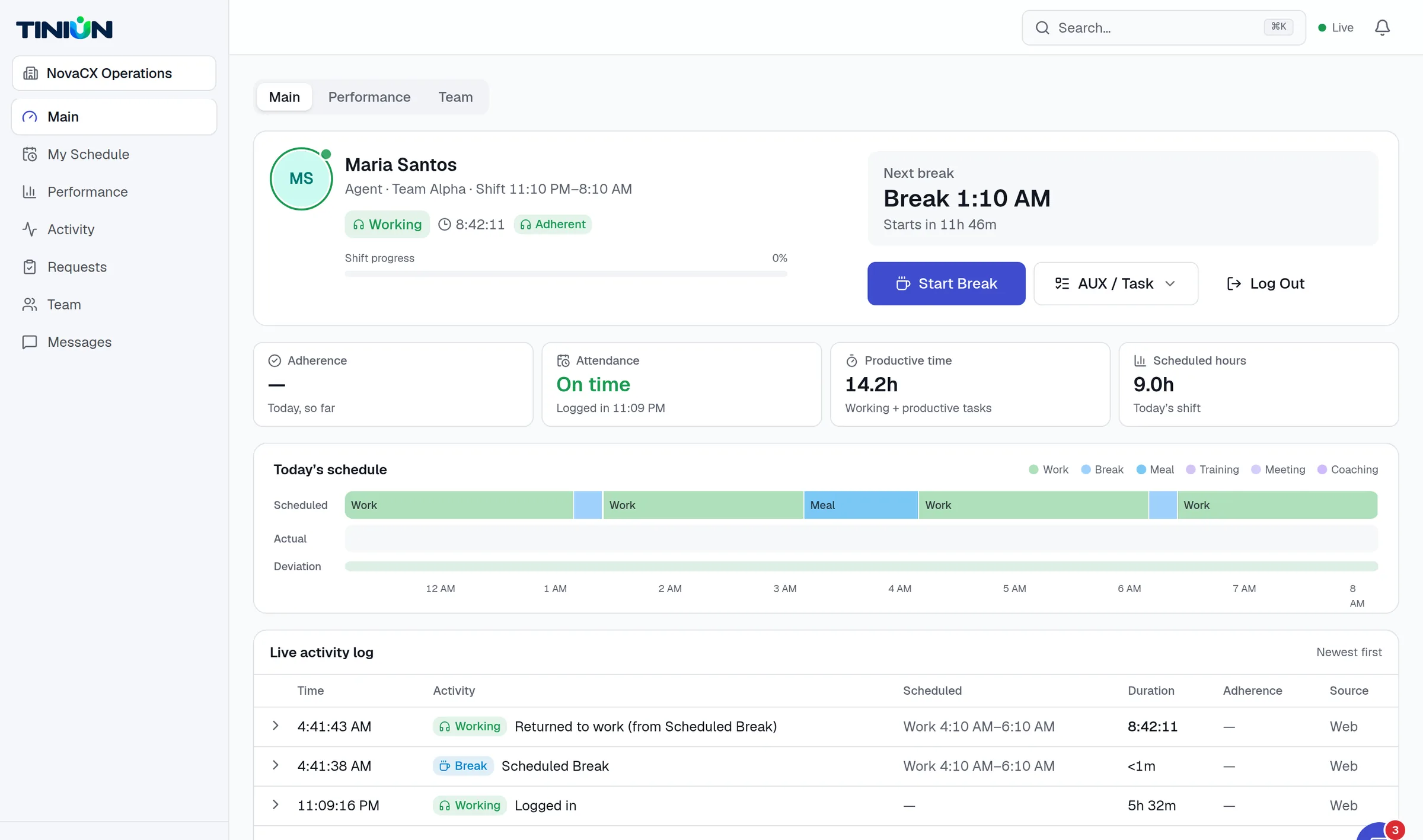
An agent view that keeps people on plan
- The day's schedule and the next break, front and center
- One tap to start a break, switch to an AUX task or log out — with safeguards against double taps
- Scheduled versus actual timeline and a live activity log
- Personal adherence and performance, updated as the shift runs
Everything around the floor
The rest of the workforce workflow, built in.
Scheduling & publishing
Shifts with break, meal and training segments, and versioned schedule publishing with change history.
Requests & approvals
Time off, shift swaps and schedule changes, requested by agents and decided by leads.
Coaching
Run coaching sessions from the floor, track time as coaching, and keep notes and action items.
Reports
Daily agent and team rollups for adherence, productive time, breaks and exceptions — export to CSV.
Team messaging
Direct and team conversations, linked to the agent or exception they're about.
Admin that fits your floor
Teams, roles, activity types, adherence rules, webhooks and API keys — configured per organization.
How it works
Plan. Watch. Act.
A closed loop between the schedule and the floor — running continuously, all shift long.
Step 1
Plan
Build shifts, place breaks and meals, and publish. Agents see their day the moment it's live.
Step 2
Watch
Every log-in, break and return streams to the floor. Adherence is recomputed continuously against the plan.
Step 3
Act
Deviations become exceptions routed to the right lead. Message, coach or resolve — with the full context one click away.
Who it's for
The right view for every seat on the floor.
Each role lands on the screen that matters to them — and sees only what their role allows.
Agents
- See the day's schedule and next break
- One-tap break, AUX and log-out
- Own adherence and performance, live
Team leads
- A live floor sorted by what needs attention
- Exceptions routed to you, with context
- Message and coach without leaving the floor
Supervisors & operations
- Coverage, adherence and exceptions across teams
- Approve requests and publish schedules
- Daily rollups and CSV exports
Admins & IT
- SSO with SAML 2.0 and OpenID Connect
- Roles scoped to organization, department or team
- Audit history for every sensitive change
Security & trust
Enterprise-grade, from the database up.
Workforce data is sensitive. TINIUN is built so that the protections don't depend on every screen getting it right.
Read about securityTenant isolation in the database
Row-level security keeps each organization's data separate on every query.
Single sign-on
SAML 2.0 and OpenID Connect, with server-side sessions you can revoke.
Least-privilege roles
Permissions scoped to organization, department, team or self.
Append-only audit history
Status events, attendance corrections and admin changes can't be edited.
Encrypted connections
All traffic is served over HTTPS; data is encrypted at rest by our infrastructure providers.
Idempotent, conflict-safe actions
Duplicate taps and stale screens can't corrupt an agent's timeline.
FAQ
Questions, answered.
Who is TINIUN built for?
Contact centers, BPOs and any operation where people work to a schedule and every minute on the floor matters — from a single team to multi-site operations running around the clock.
How is adherence calculated?
Each shift is broken into segments — work, breaks, meals, training and so on. TINIUN compares what each agent is actually doing with what the segment calls for, minute by minute, and applies your adherence rules (like grace periods) before flagging a deviation.
Does it work across sites and time zones?
Yes. Organizations, locations and schedules each carry their own time zone, so a team lead in one city sees another site's shifts in the right local time.
Can we sign in with our identity provider?
Yes. TINIUN supports single sign-on over SAML 2.0 and OpenID Connect, alongside email and password for smaller teams.
How is our data kept separate from other customers?
Every record belongs to one organization, and the database enforces that boundary with row-level security on every request. Access inside your organization is further limited by role and team.
Where is our data stored?
Primary application data is stored in Singapore. See our Security page and Privacy Policy for the full list of infrastructure providers and what each one processes.
See your floor in TINIUN.
A 30-minute walkthrough with your schedules and your workflows — and an honest answer on whether TINIUN fits.